
Table of Contents
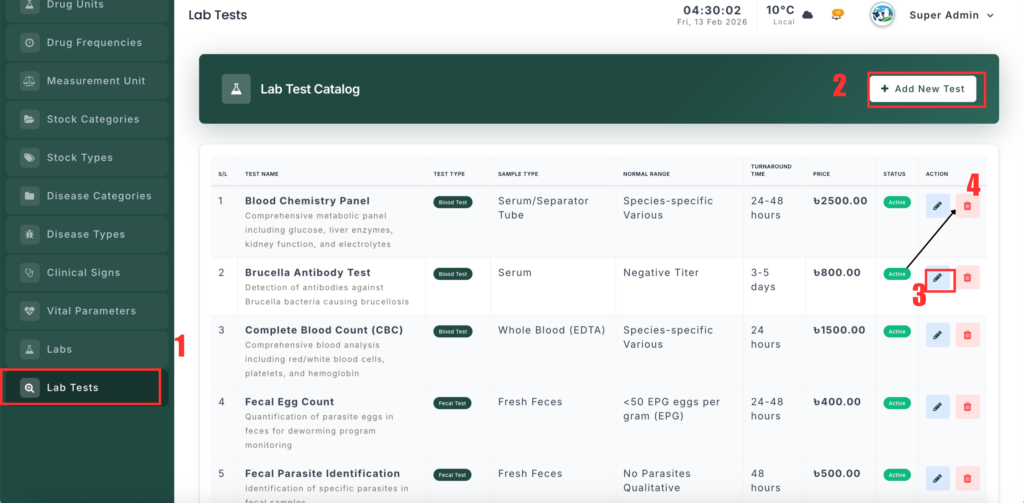
The Lab Test Management module lets you create and manage laboratory tests, including pricing, ranges, and sample requirements.
📍 Page Link #
http://127.0.0.1:8000/lab-test
Key Functions #
1️⃣ View Lab Tests #
- See all tests in a list.
- Shows Test Name, Type, Price, and Status.
- Data is filtered by the selected branch.
2️⃣ Add a New Lab Test #
- Click Add New Test.
- Enter Test Name.
- Select Test Type (Blood, Milk, Urine, etc.).
- Add Normal Range and Unit.
- Enter Price and Turnaround Time.
- Specify Sample Type.
- Set Status (Active/Inactive).
- Click Save.
3️⃣ Edit a Lab Test #
- Click Edit next to a test.
- Update details like price, range, or status.
- Click Update.
4️⃣ Delete a Lab Test #
- Click Delete and confirm.
- This removes the test from the system.


Leave a Reply
You must be logged in to post a comment.