
Table of Contents
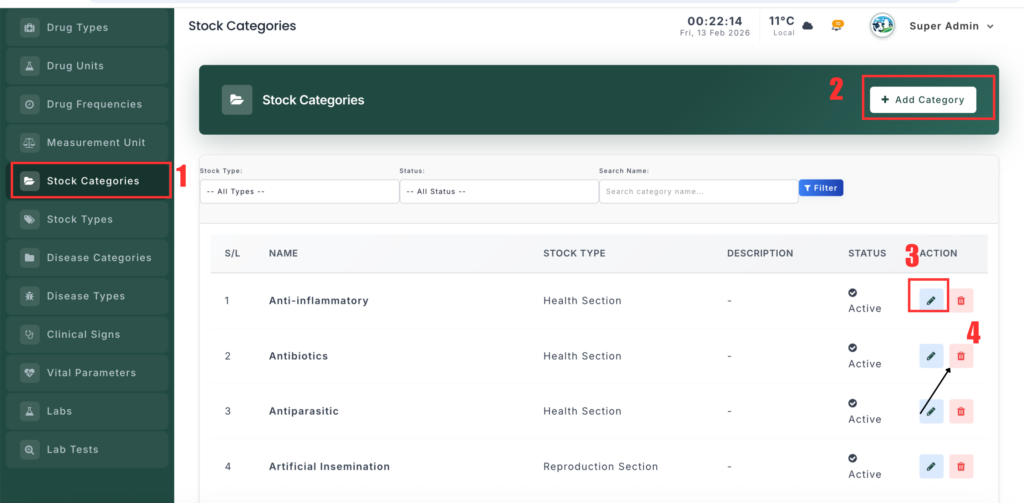
The Stock Category Management section helps you organize inventory items into categories (such as Antibiotics, Feed, Vitamins). Each category is linked to a Stock Type to keep inventory properly structured.
📍 Page Link #
http://127.0.0.1:8000/stock-category
Feature Overview #
This module helps you:
- Create and manage stock categories.
- Link categories to a parent Stock Type.
- Keep inventory organized for easy tracking.
- Search and filter categories quickly.
What You Can Do #
1️⃣ View Stock Categories #
- Open the Stock Category page.
- You will see a list of all categories.
- Each row shows the category name, stock type, and status.
2️⃣ Add a New Category #
- Click “Add Stock Category”.
- Enter the Category Name.
- Select a Stock Type (example: Medicine, Feed).
- (Optional) Add a description.
- Choose Active/Inactive status.
- Click Save.
3️⃣ Edit a Category #
- Click Edit next to a category.
- Update the name, type, or description.
- Click Update to save changes.
4️⃣ Delete a Category #
- Click Delete next to a category.
- Confirm the action.
- The category will be removed if not linked to active records.


Leave a Reply
You must be logged in to post a comment.