
Table of Contents
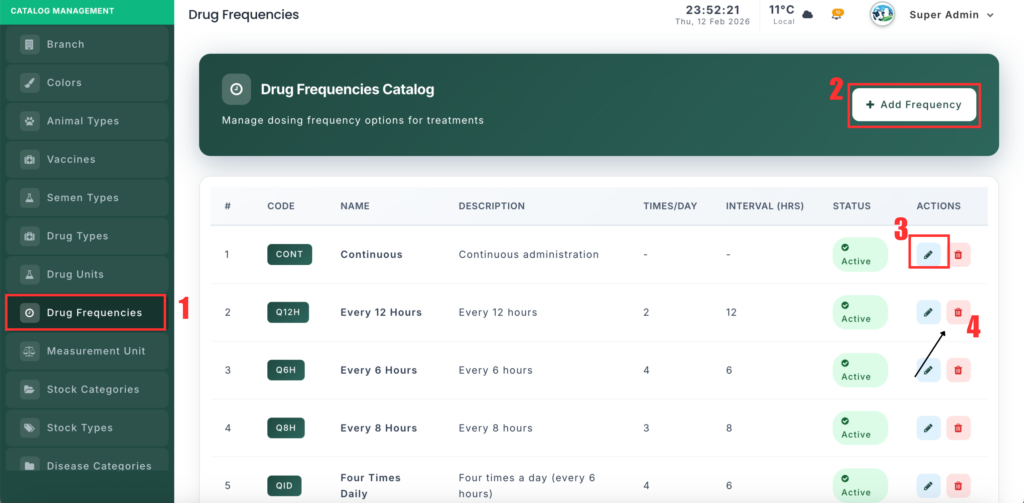
The Drug Frequency Management section allows you to define how often a medicine should be given (for example: Twice Daily, Every 8 Hours). These schedules are used during treatment to ensure correct medication timing.
📍 Page Link #
http://127.0.0.1:8000/drug-frequency
Feature Overview #
This module helps you:
- Create standard medicine administration schedules.
- Define how many times a drug is given per day.
- Set the interval (hours) between doses.
- Add short medical codes (like BID, TID) for quick selection.
- Enable or disable frequency records.
What You Can Do #
1️⃣ View Drug Frequencies #
- Open the Drug Frequency page.
- You will see a list of all schedules.
- Each record shows the name, code, times per day, interval hours, and status.
2️⃣ Add a New Frequency #
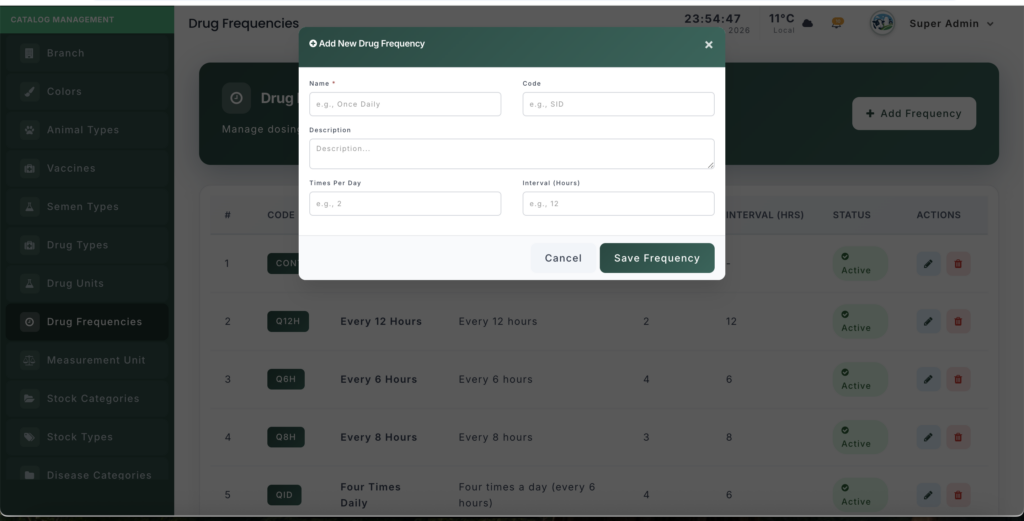
- Click “Add Frequency”.
- Enter the frequency name (example: Twice Daily).
- (Optional) Enter a short code (example: BID).
- Enter times per day (example: 2).
- Enter interval hours (example: 12).
- Set the status (Active/Inactive).
- Click Save.
3️⃣ Edit a Frequency #
- Click Edit next to a record.
- Update schedule details or status.
- Click Update to save changes.
4️⃣ Delete a Frequency #
- Click Delete next to a record.
- Confirm the action.
- The frequency will be removed from the list.


Leave a Reply
You must be logged in to post a comment.