
Table of Contents
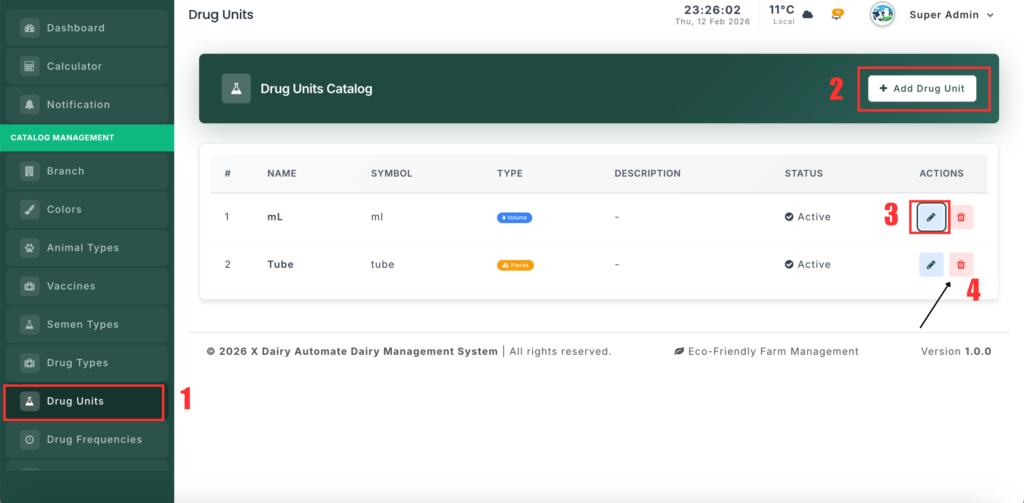
The Drug Unit Management section allows you to manage measurement units used for veterinary medicines, such as ml, grams, or pieces. These units help ensure accurate dosage and inventory tracking.
📍 Page Link #
http://127.0.0.1:8000/drug-unit
Feature Overview #
This module helps you:
- Maintain a list of drug measurement units.
- Define unit symbols for easy display.
- Categorize units by type (Volume, Weight, Pieces).
- Enable or disable units when needed.
What You Can Do #
1️⃣ View Drug Units #
- Open the Drug Unit page.
- You will see a list of all units.
- Each record shows the unit name, symbol, type, and status.
2️⃣ Add a New Drug Unit #
- Click “Add Drug Unit”.
- Enter the unit name (example: Milliliter).
- Enter the symbol (example: ml).
- Select the type (Volume, Weight, or Pieces).
- (Optional) Add a description.
- Set the status (Active/Inactive).
- Click Save.
3️⃣ Edit a Drug Unit #
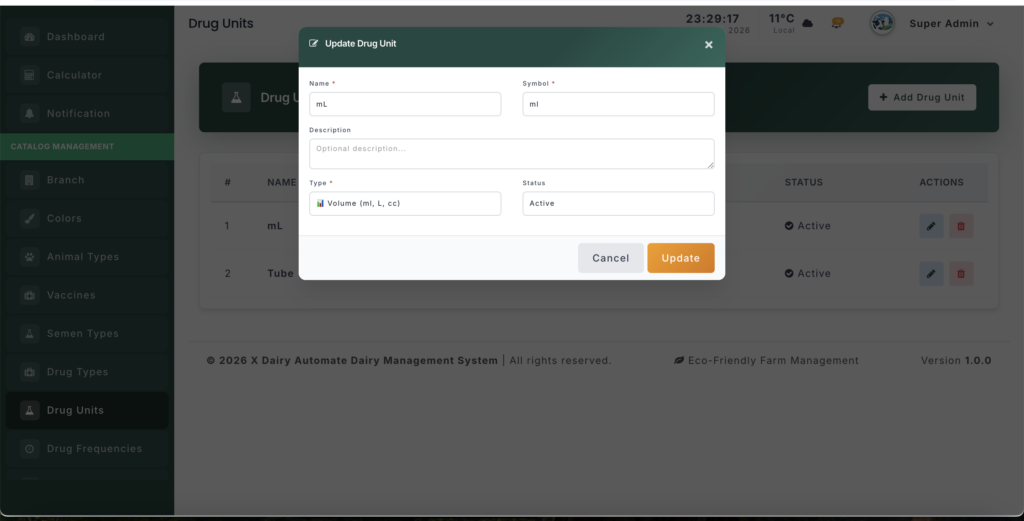
- Click Edit next to a unit.
- Update the name, symbol, type, or status.
- Click Update to save changes.
4️⃣ Delete a Drug Unit #
- Click Delete next to a unit.
- Confirm the action.
- The unit will be permanently removed.


Leave a Reply
You must be logged in to post a comment.