
Table of Contents
Manage your farm branches and locations in X Dairy Automate
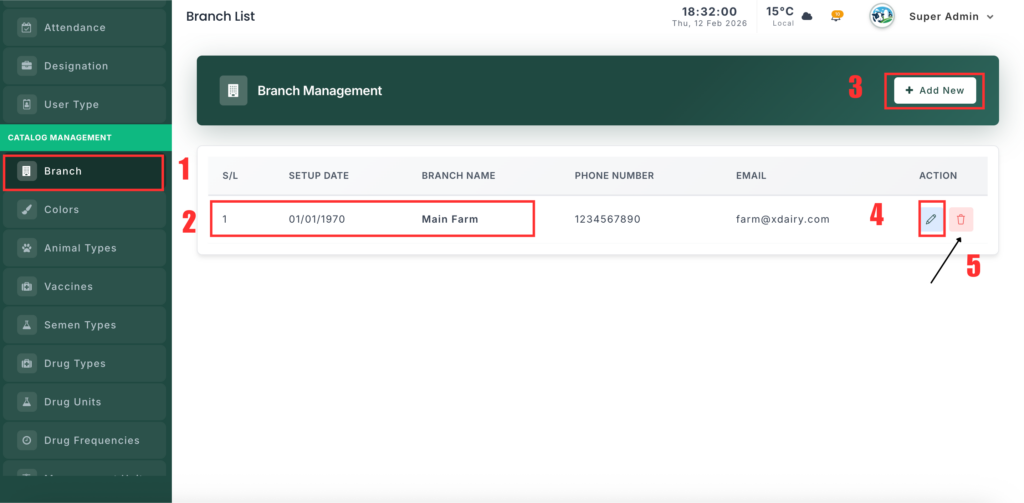
Step 1: Access Branch Management #
- Log in to your admin panel
- Go to Branch in the sidebar
- Or open directly:
/branch
Step 2: View All Branches #
The branch list displays:
| Column | Description |
|---|---|
| # | Serial number |
| Setup Date | Date the branch was established |
| Branch Name | Name of the branch/farm |
| Phone No | Primary contact number |
| Branch email address | |
| Action | Edit / Delete options |
Step 3: Add a New Branch #
- Click Add New
- Fill in the branch details:
| Field | Description | Required |
|---|---|---|
| Branch Name | Official name of the branch | ✅ |
| Phone Number | Contact phone number | ✅ |
| Contact email address | ✅ | |
| Setup Date | Establishment date | ✅ |
| Address | Full branch address | ✅ |
- Click Save to create the branch
Step 4: Edit a Branch #
- Locate the branch in the list
- Click ✏️ Edit
- Update the fields as needed
- Click Update
✔️ Edits apply immediately across the system.
Step 5: Delete a Branch #
- Find the branch
- Click 🗑️ Delete
- Confirm when prompted
⚠️ Warning: Deleting a branch may impact connected records.
Make sure there are no active animals, transactions, or records linked before deleting.
Step 6: Switch Between Branches #
When managing multiple branches:
- Open the branch selector:
/select-branch - Choose the branch you want to work in
- The system automatically filters data to the selected branch
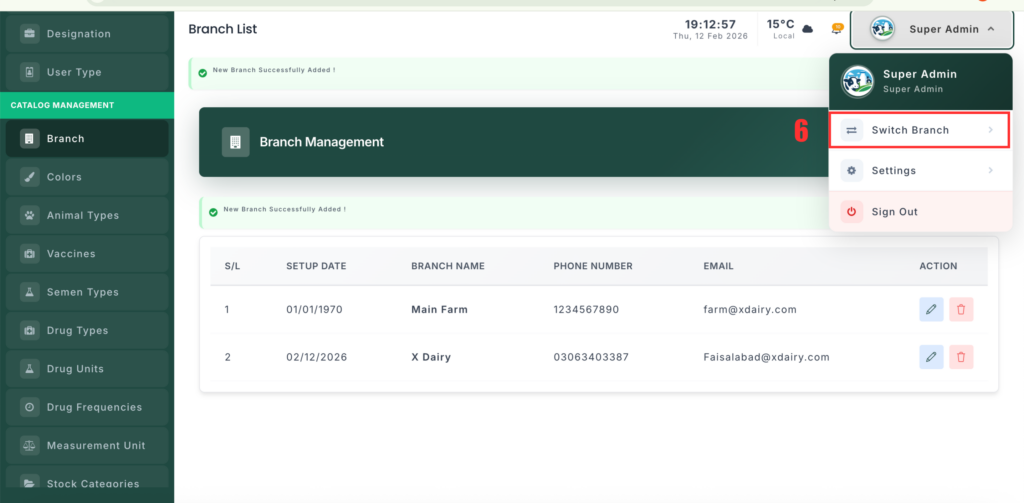
💡 Each branch operates independently — reports, animals, and transactions display only for the active branch.
Use Cases #
| Scenario | Recommendation |
|---|---|
| Single Farm | Create one branch (e.g., “Main Farm”) |
| Multiple Locations | Create one branch per physical site |
| Separate Operations | Create branches for different activities (e.g., Dairy, Beef, Processing) |
Example Branches #
| Branch Name | Setup Date | Purpose |
|---|---|---|
| Main Farm | 01/01/2020 | Primary dairy operation |
| North Pasture | 06/15/2022 | Grazing and young stock |
| Processing Unit | 03/10/2023 | Milk processing facility |


Leave a Reply
You must be logged in to post a comment.