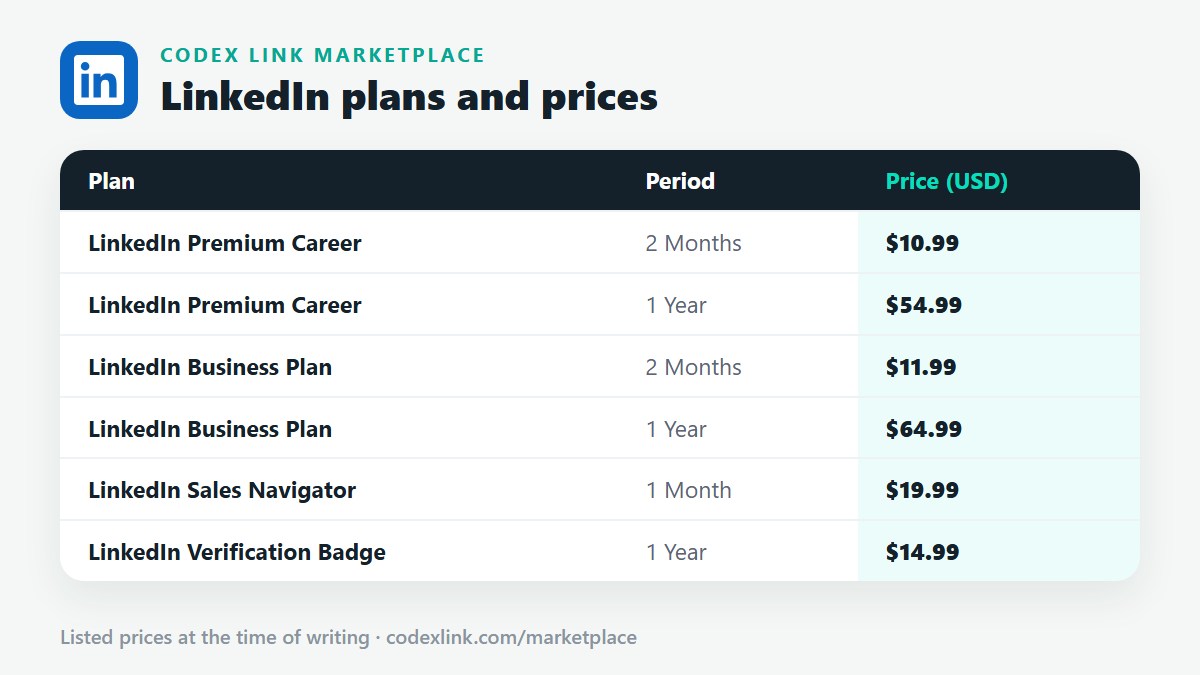
All three Sales Navigator tiers include the same 50 InMail credits a month and the same advanced search — what changes is team and CRM depth. Core is for a solo seller. Advanced adds team collaboration, TeamLink warm introductions and AI research summaries. Advanced Plus adds full two-way CRM sync, writeback and embedded CRM views, and is sold on a quote basis. Check LinkedIn's Sales Solutions page for current tier prices; CodeX Link lists Sales Navigator at $19.99 for 1 month, and you should confirm which tier that is on WhatsApp before ordering.
Key takeaways
- Core, Advanced and Advanced Plus all include 50 InMail credits a month — the tiers differ on team and CRM features, not messaging volume.
- Advanced adds TeamLink, shared lists, AI research summaries and CRM import; Advanced Plus adds full two-way CRM sync and embedded CRM views.
- Sales Navigator is a separate product from Premium: you do not need a Premium plan to use it, and cancelling one does not cancel the other.
- Advanced Plus is sold on a quote basis to larger teams — there is no fixed public price for it on this page.
- Confirm the tier before you buy: CRM sync is not included in Core, so assuming it is included is the most expensive mistake.
Sales Navigator's three tiers look similar on the surface, and LinkedIn's own pricing pages change often enough that this page states no tier prices of its own. What it does state, from LinkedIn's published tier comparisons, is what each tier actually adds — so you can buy the tier that includes the feature you need, especially CRM sync, instead of discovering it is missing afterwards.
Do you need Premium, and how do you get in
Do I need LinkedIn Premium to use Sales Navigator?
No. Sales Navigator is a separate product with its own subscription, search, inbox and home feed — not a bigger Premium tier, as our Sales Navigator guide explains. You can hold Sales Navigator without any Premium plan, and cancelling a Premium plan does not cancel Sales Navigator, or the other way round: each subscription is managed on its own.
How do I log in to Sales Navigator?
With the same LinkedIn account that holds the subscription: open Sales Navigator from your LinkedIn account menu and you land in its own workspace, with your saved leads, lists and alerts. If you land on ordinary LinkedIn instead, check you are signed in to the account the subscription belongs to — subscriptions are tied to one account and cannot be moved, as explained on our pause, transfer and sharing page.
Can I trial Sales Navigator before paying?
Eligible members are generally offered a free trial of Sales Navigator Core, with the same eligibility and early-cancellation rules as the Premium trial: a payment method is required, it converts automatically unless cancelled, and cancelling a trial early ends it immediately. Our free trial page explains eligibility in full, and our discounts page shows where to find the trial offer while signed in.
The three tiers
What is the difference between Sales Navigator Core, Advanced and Advanced Plus?
Core is for the individual seller: advanced lead and account search with 50-plus filters, saved leads and accounts, custom lists, real-time alerts, lead recommendations and 50 InMail credits a month. Advanced adds everything in Core plus team features and AI research. Advanced Plus adds everything in Advanced plus deep CRM integration for larger organisations. All three tiers include the same 50 monthly InMails, so choose by team and CRM needs, not by message volume.
What is TeamLink in Sales Navigator?
TeamLink, included from Advanced upwards, shows you warm paths into an account through your colleagues: if a teammate is connected to a prospect, TeamLink surfaces that connection so you can ask for an introduction instead of cold-messaging. It is the main reason a team buys Advanced over Core — a solo seller with no team to link through gains nothing from it.
What are Account IQ and Lead IQ in Sales Navigator?
Account IQ and Lead IQ are AI research summaries included from Advanced upwards: Account IQ briefs you on a company — its priorities, news and hiring signals — and Lead IQ briefs you on a person, so you can open with something relevant instead of a generic pitch. They do not change search results or InMail counts; they change how fast you can research what search already found.
Does Sales Navigator sync with my CRM?
It depends on the tier, and this is the detail to confirm before you buy. Core does not include native CRM sync — you work from lists and can import a book of business by CSV. Advanced adds CRM import and team reporting. Advanced Plus adds full two-way sync with Salesforce, HubSpot, Microsoft Dynamics and Oracle: CRM records flow into Sales Navigator, and InMails, messages, notes and Smart Link views are written back to the CRM, with embedded Sales Navigator views inside the CRM itself. If CRM sync is your reason for buying, Core will disappoint you.
How do team seats and billing work for Sales Navigator?
Advanced and Advanced Plus are sold per seat to teams, with an admin managing seats and centralised billing, while Core is sold to an individual. Advanced Plus is sold on a quote basis through LinkedIn's sales team rather than at a fixed public price, which is why this page states no figure for it. For current tier prices, check LinkedIn's Sales Solutions comparison page while signed in. CodeX Link lists Sales Navigator at $19.99 for 1 month — confirm on WhatsApp which tier that listing is before ordering, because the tier decides whether you get CRM sync.
Managing the subscription
Can I cancel Sales Navigator separately from LinkedIn Premium?
Yes. Sales Navigator and Premium are separate subscriptions with separate billing, so cancelling one leaves the other running. Cancel Sales Navigator through its own subscription settings — or through Apple or Google Play if you bought it in the app — using the same steps as any Premium cancellation in our activation guide. Unused InMail credits on the cancelled product are forfeited when its period ends, just as with Premium.
What happens to my saved leads and lists if I cancel Sales Navigator?
Your lists and notes belong to the Sales Navigator subscription, so they stop being available once the period ends — export anything you need, such as lead names and companies, before the end date. Your ordinary LinkedIn connections, messages and profile are unaffected, because those belong to your LinkedIn account, not to the Sales Navigator subscription.
Frequently asked questions
Do I need LinkedIn Premium to use Sales Navigator?
No. Sales Navigator is a separate product with its own subscription, search, inbox and home feed — not a bigger Premium tier, as our Sales Navigator guide explains. You can hold Sales Navigator without any Premium plan, and cancelling a Premium plan does not cancel Sales Navigator, or the other way round: each subscription is managed on its own.
How do I log in to Sales Navigator?
With the same LinkedIn account that holds the subscription: open Sales Navigator from your LinkedIn account menu and you land in its own workspace, with your saved leads, lists and alerts. If you land on ordinary LinkedIn instead, check you are signed in to the account the subscription belongs to — subscriptions are tied to one account and cannot be moved, as explained on our pause, transfer and sharing page.
Can I trial Sales Navigator before paying?
Eligible members are generally offered a free trial of Sales Navigator Core, with the same eligibility and early-cancellation rules as the Premium trial: a payment method is required, it converts automatically unless cancelled, and cancelling a trial early ends it immediately. Our free trial page explains eligibility in full, and our discounts page shows where to find the trial offer while signed in.
What is the difference between Sales Navigator Core, Advanced and Advanced Plus?
Core is for the individual seller: advanced lead and account search with 50-plus filters, saved leads and accounts, custom lists, real-time alerts, lead recommendations and 50 InMail credits a month. Advanced adds everything in Core plus team features and AI research. Advanced Plus adds everything in Advanced plus deep CRM integration for larger organisations. All three tiers include the same 50 monthly InMails, so choose by team and CRM needs, not by message volume.
What is TeamLink in Sales Navigator?
TeamLink, included from Advanced upwards, shows you warm paths into an account through your colleagues: if a teammate is connected to a prospect, TeamLink surfaces that connection so you can ask for an introduction instead of cold-messaging. It is the main reason a team buys Advanced over Core — a solo seller with no team to link through gains nothing from it.
What are Account IQ and Lead IQ in Sales Navigator?
Account IQ and Lead IQ are AI research summaries included from Advanced upwards: Account IQ briefs you on a company — its priorities, news and hiring signals — and Lead IQ briefs you on a person, so you can open with something relevant instead of a generic pitch. They do not change search results or InMail counts; they change how fast you can research what search already found.
Does Sales Navigator sync with my CRM?
It depends on the tier, and this is the detail to confirm before you buy. Core does not include native CRM sync — you work from lists and can import a book of business by CSV. Advanced adds CRM import and team reporting. Advanced Plus adds full two-way sync with Salesforce, HubSpot, Microsoft Dynamics and Oracle: CRM records flow into Sales Navigator, and InMails, messages, notes and Smart Link views are written back to the CRM, with embedded Sales Navigator views inside the CRM itself. If CRM sync is your reason for buying, Core will disappoint you.
How do team seats and billing work for Sales Navigator?
Advanced and Advanced Plus are sold per seat to teams, with an admin managing seats and centralised billing, while Core is sold to an individual. Advanced Plus is sold on a quote basis through LinkedIn's sales team rather than at a fixed public price, which is why this page states no figure for it. For current tier prices, check LinkedIn's Sales Solutions comparison page while signed in. CodeX Link lists Sales Navigator at $19.99 for 1 month — confirm on WhatsApp which tier that listing is before ordering, because the tier decides whether you get CRM sync.
Can I cancel Sales Navigator separately from LinkedIn Premium?
Yes. Sales Navigator and Premium are separate subscriptions with separate billing, so cancelling one leaves the other running. Cancel Sales Navigator through its own subscription settings — or through Apple or Google Play if you bought it in the app — using the same steps as any Premium cancellation in our activation guide. Unused InMail credits on the cancelled product are forfeited when its period ends, just as with Premium.
What happens to my saved leads and lists if I cancel Sales Navigator?
Your lists and notes belong to the Sales Navigator subscription, so they stop being available once the period ends — export anything you need, such as lead names and companies, before the end date. Your ordinary LinkedIn connections, messages and profile are unaffected, because those belong to your LinkedIn account, not to the Sales Navigator subscription.
Want to confirm the Sales Navigator tier before you order?
Chat with the CodeX Link team for the current price and activation details, or browse every tool in the marketplace.
LinkedIn is a trademark of its owner. Prices are the CodeX Link marketplace list from October 2026 and change over time — confirm the current price on WhatsApp before you buy.