Not every LinkedIn member is offered a free trial, and a previous trial can disqualify you even more than 12 months later — LinkedIn's own eligibility wording says a past trial may block any further free Premium, so the only reliable check is the offer shown while you are signed in. And one trap catches many people: cancelling a trial early ends it immediately, unlike cancelling a paid subscription, which runs to the end of the period.
Key takeaways
- Trial eligibility depends on your account and region — not everyone is offered one, and there is no way to force an offer.
- A previous trial may block a second trial even after 12 months; the 12-month wait is a minimum, not a guarantee.
- Cancelling a trial early ends it on the spot — set a reminder for the day before it converts instead.
- Switching plans during a trial forfeits the trial benefits and starts billing immediately.
- A payment card is required for the trial, and it converts to a paid plan unless you cancel in time.
A free month of LinkedIn Premium sounds simple, but eligibility is not guaranteed, a second trial is not guaranteed either, and cancelling early has the opposite effect from cancelling a paid plan. This page answers the trial questions that the discounts and free trial guide does not cover in detail.
Eligibility
Who can get a LinkedIn Premium free trial?
Eligible members are usually offered one free month of the plan they choose, with full access to that plan's features. LinkedIn states that eligibility depends on a wide range of variables and that not all members qualify, so there is no checklist you can complete to earn an offer. If you have never had a Premium trial and you are not currently subscribed, you are in the group most likely to see one.
Why don't I see a free trial offer on my account?
Because LinkedIn has decided your account is not eligible for one at this time. The usual reasons are that you have already used a trial, you are currently on a paid plan, or your account and region combination is not included. The offer, if it exists for you, appears on the Premium page while you are signed in — if it is not there, no other page or code will create it, and codes found on coupon websites do not work, as our discounts page explains.
Can I get a second free trial of LinkedIn Premium?
Maybe, but do not count on it. LinkedIn's own eligibility wording says that members who have already used a free trial may not be eligible for any further free Premium subscriptions, even if more than 12 months have passed since the previous trial. Members who redeemed a trial within the previous 12 months are not eligible for another profile trial. So the 12-month wait is a minimum, not a promise — after it, some accounts are offered another trial and some are not, and the signed-in Premium page is the only place that tells you which group you are in.
Can I get a free trial if I already pay for LinkedIn Premium?
No. If you are already on a paid Premium plan, you are already subscribed, so there is nothing to trial. Trials are for members who have not yet subscribed to that product.
During and after the trial
Does the free trial need a credit card?
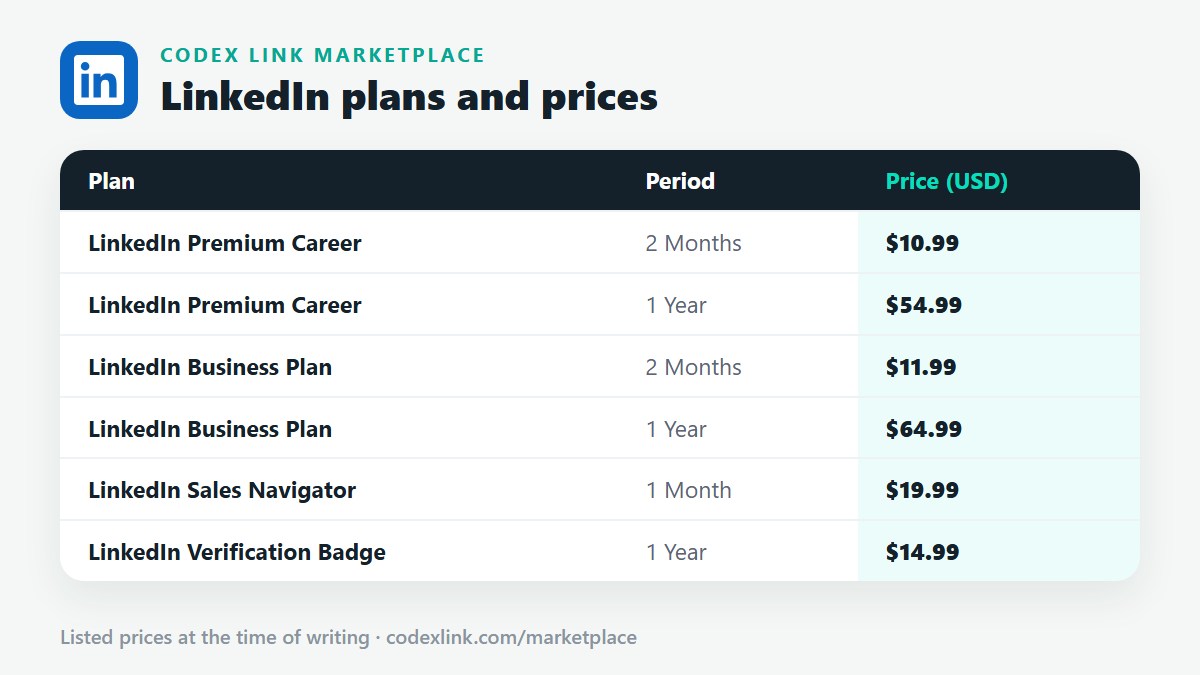
Yes. LinkedIn requires a payment method to start the trial, and the plan converts to a paid subscription automatically when the trial month ends unless you cancel before then. In some countries LinkedIn also accepts alternatives such as PayPal or a debit card for the trial; if you have no international card at all, a fixed-period plan from a reseller is the usual alternative, as explained on our discounts page.
What happens if I forget to cancel the trial?
The trial converts to a paid subscription on the billing date and the card you entered is charged for the plan you trialled. Set a calendar reminder a few days before the trial ends, and cancel at least one day before the conversion date — LinkedIn processes billing on its own schedule, so leaving it to the last hour risks a charge.
If I cancel the trial early, do I keep the remaining days?
No — and this is the trap. Cancelling a free trial early ends it immediately: you lose Premium access on the spot, including the days left in the trial month. This is different from cancelling a paid subscription, where features run to the end of the period already paid for. So do not cancel on day one to be safe; use the trial, and cancel the day before it converts.
Can I switch plans during the free trial?
Switching plans during a trial forfeits the trial benefits of the original plan, and billing starts immediately on the day you switch. If you want to try a different plan, finish the trial first — or accept that the switch ends the free period and starts a paid one.
Can I trial Sales Navigator or LinkedIn Learning too?
Yes, for eligible members: Sales Navigator Core generally has its own free trial, and LinkedIn Learning has its own one-month free trial, each with the same eligibility and early-cancellation rules as the Premium trial. Our discounts page explains how to find the Sales Navigator trial offer, and our LinkedIn Learning guide covers the Learning trial. A trial of one product does not automatically include the others.
Frequently asked questions
Who can get a LinkedIn Premium free trial?
Eligible members are usually offered one free month of the plan they choose, with full access to that plan's features. LinkedIn states that eligibility depends on a wide range of variables and that not all members qualify, so there is no checklist you can complete to earn an offer. If you have never had a Premium trial and you are not currently subscribed, you are in the group most likely to see one.
Why don't I see a free trial offer on my account?
Because LinkedIn has decided your account is not eligible for one at this time. The usual reasons are that you have already used a trial, you are currently on a paid plan, or your account and region combination is not included. The offer, if it exists for you, appears on the Premium page while you are signed in — if it is not there, no other page or code will create it, and codes found on coupon websites do not work, as our discounts page explains.
Can I get a second free trial of LinkedIn Premium?
Maybe, but do not count on it. LinkedIn's own eligibility wording says that members who have already used a free trial may not be eligible for any further free Premium subscriptions, even if more than 12 months have passed since the previous trial. Members who redeemed a trial within the previous 12 months are not eligible for another profile trial. So the 12-month wait is a minimum, not a promise — after it, some accounts are offered another trial and some are not, and the signed-in Premium page is the only place that tells you which group you are in.
Can I get a free trial if I already pay for LinkedIn Premium?
No. If you are already on a paid Premium plan, you are already subscribed, so there is nothing to trial. Trials are for members who have not yet subscribed to that product.
Does the free trial need a credit card?
Yes. LinkedIn requires a payment method to start the trial, and the plan converts to a paid subscription automatically when the trial month ends unless you cancel before then. In some countries LinkedIn also accepts alternatives such as PayPal or a debit card for the trial; if you have no international card at all, a fixed-period plan from a reseller is the usual alternative, as explained on our discounts page.
What happens if I forget to cancel the trial?
The trial converts to a paid subscription on the billing date and the card you entered is charged for the plan you trialled. Set a calendar reminder a few days before the trial ends, and cancel at least one day before the conversion date — LinkedIn processes billing on its own schedule, so leaving it to the last hour risks a charge.
If I cancel the trial early, do I keep the remaining days?
No — and this is the trap. Cancelling a free trial early ends it immediately: you lose Premium access on the spot, including the days left in the trial month. This is different from cancelling a paid subscription, where features run to the end of the period already paid for. So do not cancel on day one to be safe; use the trial, and cancel the day before it converts.
Can I switch plans during the free trial?
Switching plans during a trial forfeits the trial benefits of the original plan, and billing starts immediately on the day you switch. If you want to try a different plan, finish the trial first — or accept that the switch ends the free period and starts a paid one.
Can I trial Sales Navigator or LinkedIn Learning too?
Yes, for eligible members: Sales Navigator Core generally has its own free trial, and LinkedIn Learning has its own one-month free trial, each with the same eligibility and early-cancellation rules as the Premium trial. Our discounts page explains how to find the Sales Navigator trial offer, and our LinkedIn Learning guide covers the Learning trial. A trial of one product does not automatically include the others.
Rather skip the trial lottery and buy a fixed period?
Chat with the CodeX Link team for the current price and activation details, or browse every tool in the marketplace.
LinkedIn is a trademark of its owner. Prices are the CodeX Link marketplace list from October 2026 and change over time — confirm the current price on WhatsApp before you buy.