Buying a Premium plan that is activated on your own LinkedIn account is a normal way to buy — but buying somebody else's account, or a login shared between strangers, is not: LinkedIn bans selling and transferring accounts, and those accounts get restricted. The single clearest safety test is the password test: a legitimate plan for your own account should never need your LinkedIn password. If a seller asks for it, walk away.
Key takeaways
- A plan activated on your own account and a bought or shared account are two different things — only the first is safe.
- Never hand your LinkedIn password to any seller, for any reason.
- Before you pay, confirm the plan, the length, how it is activated, and what happens if it stops working.
- If a plan stops working, contact the seller you bought from with your order details — or LinkedIn Support if you bought from LinkedIn.
- CodeX Link's own replacement and refund terms are not stated on this page: ask the team on WhatsApp before you order.
LinkedIn Premium is sold by LinkedIn itself and by resellers, and most reseller problems come from one misunderstanding: a plan activated on your own account and an account bought from someone else are not the same product. This page separates the two, gives the checks to run before you pay anyone, and states plainly what this site does not claim about its own terms.
The safety question
Is it safe to buy LinkedIn Premium from a reseller?
It depends entirely on what you are buying. A plan that is activated on your own LinkedIn account — the model CodeX Link describes on this site, where the team sends activation steps for your own account — is a normal purchase route, and the checks on this page still apply. What is not safe is buying an account that belongs to someone else, or a login shared between several buyers: LinkedIn's User Agreement bans selling and transferring accounts, and accounts bought this way are routinely restricted or closed, taking any connections and messages with them.
Should a seller ever ask for my LinkedIn password?
No. A plan for your own account should never need your LinkedIn password, and neither should any activation step you can do yourself. This site already states the rule plainly: never share your LinkedIn password with someone you do not trust. Treat any password request as an instant reason to stop, whatever the seller promises — it is the clearest single red flag in this market.
What is the difference between a plan for my account and a bought account?
A plan for your own account leaves you in control: your profile, your connections, your billing, and your ability to contact support. A bought account leaves you holding someone else's identity: the original holder can reclaim it or cancel it, LinkedIn can restrict it at any identity check because you cannot prove you are the original owner, and any connections on it were never yours. If a seller talks about handing over a login rather than activating a plan on your account, you are being sold the second thing.
Spotting scams
What are the red flags of a LinkedIn Premium scam?
Stop if you see any of these: a password request; a login being handed over; prices far below every other seller for the same plan; payment demanded only in cryptocurrency, gift cards or money-transfer apps; claims of being an official LinkedIn partner or authorised reseller for accounts (LinkedIn has no such account-reseller programme); promises of a guaranteed no-ban or instant replacement; pressure tactics such as last-accounts-at-this-price; or reviews that exist only on the seller's own website. Any one of these is enough to walk away.
Can buying from a reseller get my account restricted?
Buying a plan for your own account does not by itself put your account at risk. What gets accounts restricted is breaking LinkedIn's rules: using someone else's account, sharing logins, running automation or mass outreach, or using fake identities. Keep your buying inside the first category, keep your outreach human and targeted, and your account stays on the safe side of that line.
Are free LinkedIn Premium account offers real?
No. Websites promising free Premium accounts are usually scams designed to steal logins, and the same warning appears on our discounts and free trial page: the only legitimate free route is LinkedIn's own one-month trial for eligible members, plus Premium or Learning provided by an employer, university or library. An offer of a free account in exchange for your login is a credential-theft attempt, not a bargain.
Before you pay, and if something goes wrong
What should I confirm before I pay a reseller?
Four things, in writing, before money changes hands: exactly which plan you are getting; how long it lasts and what date it ends; how it is activated on your own account; and what happens if it stops working — who you contact and what support you get. Our buying guide gives the same checklist for any reseller. If a seller cannot answer all four clearly, do not pay.
How do I check the plan is really active on my account?
Open your Premium features page from your profile menu and confirm the plan name and period are shown there, then open one Premium-only feature — for example the full profile-viewer list — and confirm it works. Do this as soon as activation is complete, not weeks later: a problem found on day one is far easier to resolve than one found after the period has run down.
What do I do if the plan stops working?
Contact the seller you bought from first, with your order details, and give them a chance to complete the activation or explain the problem — that is the route our activation guide gives for reseller-bought plans. If you bought from LinkedIn directly, contact LinkedIn Support through the Help Centre instead. If you bought from CodeX Link, message the team on WhatsApp: this page does not state CodeX Link's replacement or refund terms, because those are the seller's own terms and must come from the team, not from this guide — ask before you order so there are no surprises.
Frequently asked questions
Is it safe to buy LinkedIn Premium from a reseller?
It depends entirely on what you are buying. A plan that is activated on your own LinkedIn account — the model CodeX Link describes on this site, where the team sends activation steps for your own account — is a normal purchase route, and the checks on this page still apply. What is not safe is buying an account that belongs to someone else, or a login shared between several buyers: LinkedIn's User Agreement bans selling and transferring accounts, and accounts bought this way are routinely restricted or closed, taking any connections and messages with them.
Should a seller ever ask for my LinkedIn password?
No. A plan for your own account should never need your LinkedIn password, and neither should any activation step you can do yourself. This site already states the rule plainly: never share your LinkedIn password with someone you do not trust. Treat any password request as an instant reason to stop, whatever the seller promises — it is the clearest single red flag in this market.
What is the difference between a plan for my account and a bought account?
A plan for your own account leaves you in control: your profile, your connections, your billing, and your ability to contact support. A bought account leaves you holding someone else's identity: the original holder can reclaim it or cancel it, LinkedIn can restrict it at any identity check because you cannot prove you are the original owner, and any connections on it were never yours. If a seller talks about handing over a login rather than activating a plan on your account, you are being sold the second thing.
What are the red flags of a LinkedIn Premium scam?
Stop if you see any of these: a password request; a login being handed over; prices far below every other seller for the same plan; payment demanded only in cryptocurrency, gift cards or money-transfer apps; claims of being an official LinkedIn partner or authorised reseller for accounts (LinkedIn has no such account-reseller programme); promises of a guaranteed no-ban or instant replacement; pressure tactics such as last-accounts-at-this-price; or reviews that exist only on the seller's own website. Any one of these is enough to walk away.
Can buying from a reseller get my account restricted?
Buying a plan for your own account does not by itself put your account at risk. What gets accounts restricted is breaking LinkedIn's rules: using someone else's account, sharing logins, running automation or mass outreach, or using fake identities. Keep your buying inside the first category, keep your outreach human and targeted, and your account stays on the safe side of that line.
Are free LinkedIn Premium account offers real?
No. Websites promising free Premium accounts are usually scams designed to steal logins, and the same warning appears on our discounts and free trial page: the only legitimate free route is LinkedIn's own one-month trial for eligible members, plus Premium or Learning provided by an employer, university or library. An offer of a free account in exchange for your login is a credential-theft attempt, not a bargain.
What should I confirm before I pay a reseller?
Four things, in writing, before money changes hands: exactly which plan you are getting; how long it lasts and what date it ends; how it is activated on your own account; and what happens if it stops working — who you contact and what support you get. Our buying guide gives the same checklist for any reseller. If a seller cannot answer all four clearly, do not pay.
How do I check the plan is really active on my account?
Open your Premium features page from your profile menu and confirm the plan name and period are shown there, then open one Premium-only feature — for example the full profile-viewer list — and confirm it works. Do this as soon as activation is complete, not weeks later: a problem found on day one is far easier to resolve than one found after the period has run down.
What do I do if the plan stops working?
Contact the seller you bought from first, with your order details, and give them a chance to complete the activation or explain the problem — that is the route our activation guide gives for reseller-bought plans. If you bought from LinkedIn directly, contact LinkedIn Support through the Help Centre instead. If you bought from CodeX Link, message the team on WhatsApp: this page does not state CodeX Link's replacement or refund terms, because those are the seller's own terms and must come from the team, not from this guide — ask before you order so there are no surprises.
Buying a plan and want the terms confirmed first?
Chat with the CodeX Link team for the current price and activation details, or browse every tool in the marketplace.
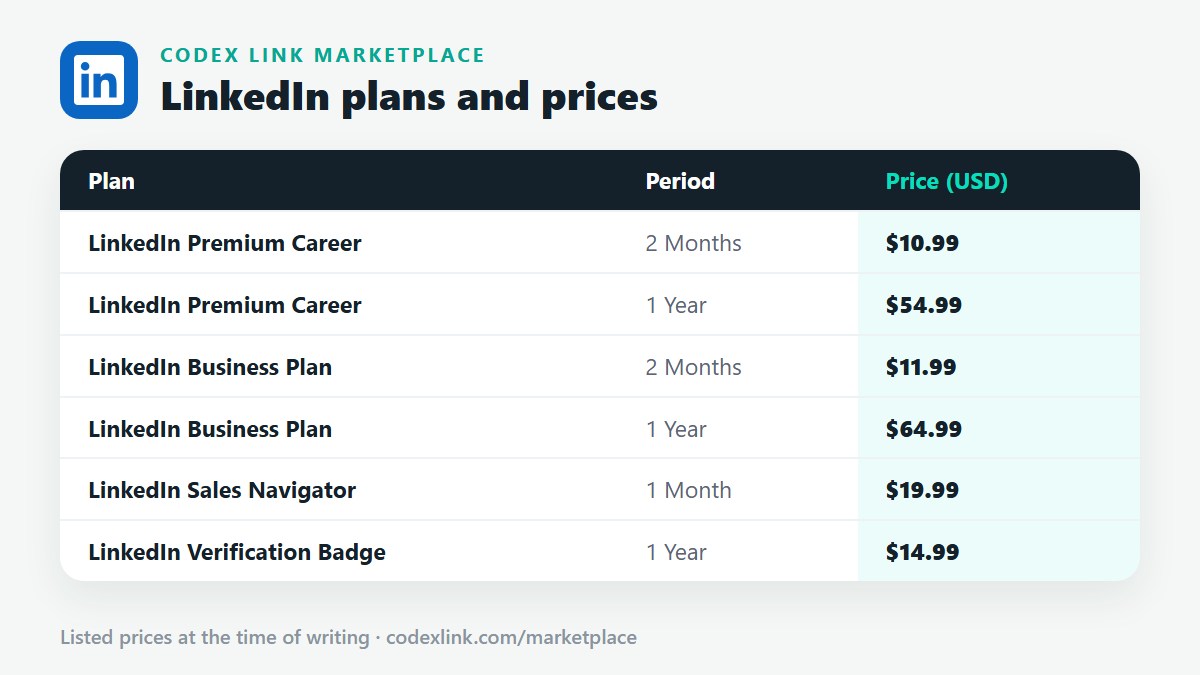
LinkedIn is a trademark of its owner. Prices are the CodeX Link marketplace list from October 2026 and change over time — confirm the current price on WhatsApp before you buy.