LinkedIn accepts major cards everywhere and PayPal in selected countries, but the method shown at your checkout depends on your country — and once a subscription is active, its billing currency cannot be changed. The other common surprise is the charge itself: tax is added at checkout in many countries, and subscriptions bought inside the phone app cost more than the same plan bought on LinkedIn's website, because the app store takes a commission.
Key takeaways
- Cards are accepted widely; PayPal is available in selected countries, and regional methods vary — your checkout shows what your country gets.
- Billing currency cannot be changed on an active subscription, so set your location correctly before you buy.
- Subscriptions bought in the iPhone app are billed by Apple, and Android purchases by Google Play — cancel through the store, not LinkedIn settings.
- Tax, app-store markup and the end of a promotion are the usual reasons a charge is higher than the headline price.
- CodeX Link's own accepted payment methods and selling prices are confirmed on WhatsApp, not stated here.
Payment questions are where most Premium confusion lives: which methods LinkedIn accepts, why the charge is higher than the headline price, and why a subscription bought in the phone app cannot be cancelled from LinkedIn's settings. This page answers them from LinkedIn's own published billing rules, and keeps CodeX Link's own selling terms where they belong — confirmed on WhatsApp before you order.
Payment methods
Which payment methods does LinkedIn accept for Premium?
Major credit and debit cards — Visa, Mastercard, American Express and Discover — are accepted widely. Beyond cards, what you are offered depends on your country: some countries get regional methods, and enterprise buyers may be billed by invoice. The reliable way to know your options is to open the Premium checkout while signed in: LinkedIn shows only the methods available for your account and region there.
Can I pay for LinkedIn Premium with PayPal?
In selected countries, yes — PayPal is supported for desktop purchases of Premium accounts, though only one PayPal account can be linked to each LinkedIn account, and PayPal is not accepted for LinkedIn's advertising products. If PayPal does not appear at your checkout, your country is not among those where LinkedIn offers it, and no setting will add it. If you have no international card at all, a fixed-period plan from a reseller that accepts local payment is the usual alternative.
Can I pay for LinkedIn Premium in PKR through CodeX Link?
Ask the team on WhatsApp which payment methods they accept for the plan you want. CodeX Link takes orders on WhatsApp and works with local payment methods, as our price-by-country guide explains — but this page does not list a fixed set of methods or a PKR selling price, because those are the seller's own current terms and must be confirmed before you order.
Why was my card declined for LinkedIn Premium?
The usual causes are a card that is not enabled for international or online payments, insufficient funds, an expired card, or a bank blocking the charge. Update the payment method in your Premium settings and try again; if it still fails, ask your bank whether it blocked the transaction. Our activation guide covers the full failed-payment checklist.
Billing country, currency and charges
Can I change my billing currency or country for LinkedIn Premium?
Not on an active subscription: LinkedIn's own billing help states that the currency for an active subscription cannot be changed, and your location must be set correctly to match the currency you want before you buy. Price follows your billing address and payment method, not your IP address — which is also why a VPN cannot get you a cheaper country's price, as our price-by-country guide explains. To change currency, cancel the current plan and subscribe again with the correct location set, accepting that a promotional price may not come back.
Why is my LinkedIn Premium charge higher than the headline price?
Three usual reasons. First, tax: in many countries the listed price is pre-tax and VAT or GST is added at checkout — 20% in the UK, 18% GST in India, 19% MwSt. in Germany, and the Eurozone rates listed on our country pages. Second, app-store markup: subscriptions bought inside the phone app include the store's commission. Third, a promotion ending: a discounted first period reverting to the standard rate looks like a price rise but is the promotion expiring. Check your purchase history in Settings to see the tax and plan breakdown of any charge.
I bought LinkedIn Premium in the app — who bills me?
The app store does. Subscriptions bought in the iPhone app are managed in your Apple subscriptions, and Android purchases are confirmed through Google Play — LinkedIn's own settings cannot cancel a store-billed subscription. Cancel through the store that billed you (Apple: device Settings, then your name, then Subscriptions; Google Play: the Play Store subscriptions section), and keep the store's confirmation as your proof.
Can I pay for LinkedIn Premium in instalments?
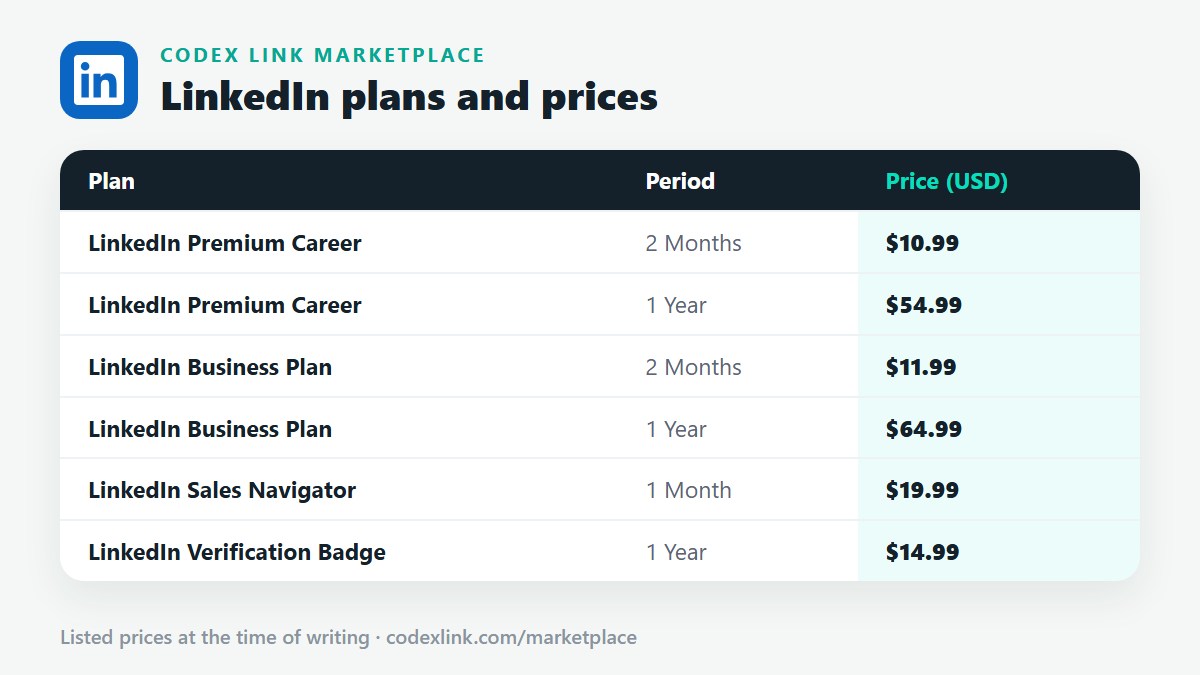
LinkedIn does not publish a part-payment or instalment option for individual Premium plans: plans are billed as one monthly or annual charge on the billing date. Monthly billing is the smallest commitment LinkedIn itself offers; if even that is more than you want to commit, a short fixed-period plan — CodeX Link lists Career and Business for 2 months and Sales Navigator for 1 month — is the smaller upfront alternative.
Invoices and failed payments
How do I get an invoice or receipt for LinkedIn Premium?
Open Settings, then subscriptions and payments, then view purchase history: each transaction has a receipt you can open, download or print. Enterprise buyers may be billed by invoice instead; individual members get email receipts. Full steps are in our activation, billing and cancellation guide.
What happens if a LinkedIn Premium payment fails?
LinkedIn will usually retry the payment method, and your Premium features may pause if the payment cannot be collected. Update the payment method in your Premium settings, confirm the card allows international and online payments, and try again. If the plan has already lapsed, resubscribing from the Premium page restores it at the current price — a promotional price is not guaranteed to return.
Frequently asked questions
Which payment methods does LinkedIn accept for Premium?
Major credit and debit cards — Visa, Mastercard, American Express and Discover — are accepted widely. Beyond cards, what you are offered depends on your country: some countries get regional methods, and enterprise buyers may be billed by invoice. The reliable way to know your options is to open the Premium checkout while signed in: LinkedIn shows only the methods available for your account and region there.
Can I pay for LinkedIn Premium with PayPal?
In selected countries, yes — PayPal is supported for desktop purchases of Premium accounts, though only one PayPal account can be linked to each LinkedIn account, and PayPal is not accepted for LinkedIn's advertising products. If PayPal does not appear at your checkout, your country is not among those where LinkedIn offers it, and no setting will add it. If you have no international card at all, a fixed-period plan from a reseller that accepts local payment is the usual alternative.
Can I pay for LinkedIn Premium in PKR through CodeX Link?
Ask the team on WhatsApp which payment methods they accept for the plan you want. CodeX Link takes orders on WhatsApp and works with local payment methods, as our price-by-country guide explains — but this page does not list a fixed set of methods or a PKR selling price, because those are the seller's own current terms and must be confirmed before you order.
Why was my card declined for LinkedIn Premium?
The usual causes are a card that is not enabled for international or online payments, insufficient funds, an expired card, or a bank blocking the charge. Update the payment method in your Premium settings and try again; if it still fails, ask your bank whether it blocked the transaction. Our activation guide covers the full failed-payment checklist.
Can I change my billing currency or country for LinkedIn Premium?
Not on an active subscription: LinkedIn's own billing help states that the currency for an active subscription cannot be changed, and your location must be set correctly to match the currency you want before you buy. Price follows your billing address and payment method, not your IP address — which is also why a VPN cannot get you a cheaper country's price, as our price-by-country guide explains. To change currency, cancel the current plan and subscribe again with the correct location set, accepting that a promotional price may not come back.
Why is my LinkedIn Premium charge higher than the headline price?
Three usual reasons. First, tax: in many countries the listed price is pre-tax and VAT or GST is added at checkout — 20% in the UK, 18% GST in India, 19% MwSt. in Germany, and the Eurozone rates listed on our country pages. Second, app-store markup: subscriptions bought inside the phone app include the store's commission. Third, a promotion ending: a discounted first period reverting to the standard rate looks like a price rise but is the promotion expiring. Check your purchase history in Settings to see the tax and plan breakdown of any charge.
I bought LinkedIn Premium in the app — who bills me?
The app store does. Subscriptions bought in the iPhone app are managed in your Apple subscriptions, and Android purchases are confirmed through Google Play — LinkedIn's own settings cannot cancel a store-billed subscription. Cancel through the store that billed you (Apple: device Settings, then your name, then Subscriptions; Google Play: the Play Store subscriptions section), and keep the store's confirmation as your proof.
Can I pay for LinkedIn Premium in instalments?
LinkedIn does not publish a part-payment or instalment option for individual Premium plans: plans are billed as one monthly or annual charge on the billing date. Monthly billing is the smallest commitment LinkedIn itself offers; if even that is more than you want to commit, a short fixed-period plan — CodeX Link lists Career and Business for 2 months and Sales Navigator for 1 month — is the smaller upfront alternative.
How do I get an invoice or receipt for LinkedIn Premium?
Open Settings, then subscriptions and payments, then view purchase history: each transaction has a receipt you can open, download or print. Enterprise buyers may be billed by invoice instead; individual members get email receipts. Full steps are in our activation, billing and cancellation guide.
What happens if a LinkedIn Premium payment fails?
LinkedIn will usually retry the payment method, and your Premium features may pause if the payment cannot be collected. Update the payment method in your Premium settings, confirm the card allows international and online payments, and try again. If the plan has already lapsed, resubscribing from the Premium page restores it at the current price — a promotional price is not guaranteed to return.
Want the price and payment options for your plan confirmed?
Chat with the CodeX Link team for the current price and activation details, or browse every tool in the marketplace.
LinkedIn is a trademark of its owner. Prices are the CodeX Link marketplace list from October 2026 and change over time — confirm the current price on WhatsApp before you buy.